Platform:Win98, WinME, WinXP, WinNT 4.x, Windows2000, Windows Vista Starter,Windows Vista Home Basic,Windows Vista Home Premium,Windows Vista Business,Windows Vista Enterprise,Windows Vista Ultimate,Windows Vi
Microsoft Outlook add-in. Add Contacts automatically, adds e-mail addresses to the contact folder when you reply to a message and/or send a new message. This will help you avoid losing addresses of people you correspond with.
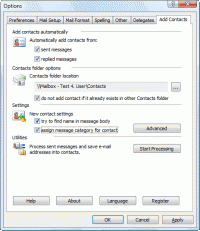
Add Contacts automatically adds e-mail addresses to the contacts folder when you reply to a message and/or send a new message. This will help you avoid losing addresses of people you correspond with. Moreover, the collected addresses can be used for mail filtering. For example, you can use the Rule Wizard to have messages from certain senders (whose addresses are in the address book) placed in a separate folder to ensure that their message will be dealt with greater priority and no important messages will be lost with deleted spam. Some spam filters also check the contact folder to rule out erratic responses to recognised senders. When a contact is being created, the add-in attempts to detect the name corresponding to the e-mail address automatically. So, if you have received a message from the address "John Smith" [smith@mail.com], the new contact created by the program will be named John Smith. However, if name detection fails, the add-in attempts to retrieve it from the message body itself. For example, if your message begins with the string "Dear John, :", the program will automatically extract the name from the greeting and create a contact named John. You can disable automatic name detection in the program settings. You can also enable the option - category assigning of created contacts. If a category is assigned to a message while sending, the same category will be assigned to the created contact. You can choose any folder as the contact destination, either in your personal mailbox or in public folders on Microsoft Exchange server. When adding a contact, Add Contacts checks the folder for possible duplicates. In the program settings, you can also instruct Add Contacts to search for contact duplicates, over all contact folders in your personal mailbox besides the specific destination folder. Designed for Microsoft Outlook 2000, 2002/XP, 2003, 2007 and 2010.
Product homepage:
http://www.mapilab.com/outlook/add_contacts/ Whats new in version 1.6.5: Support for Microsoft Outlook 2010 Beta has been added. Requirements: Microsoft Outlook 2000/XP/2003/2007/2010 (32 and 64-bit) Operating system: Win98, WinME, WinXP, WinNT 4.x, Windows2000, Windows Vista Starter,Windows Vista Home Basic,Windows Vista Home Premium,Windows Vista Business,Windows Vista Enterprise,Windows Vista Ultimate,Windows Vi Limitations: No limitations Release notes: Major update
Recover deleted ,corrupt or lost emails in eudora, can recover deleted items even if they have been cleared from the deleted items folder . Searches file structure to find all files to recover from or can add manually.
Price: $20, Rating: 8, Downloads: 114 Download
Regardless if you need targeted email addresses, 1st Email Spider is what you should use. It detects every single email on a site, not only those in mailto tags. Duplicates and invalid emails are instantly removed, try 1st Email Spider for free.
Price: $175.00, Rating: 8, Downloads: 112 Download
Secure and reliable migration can be achieved with Lotus Notes to Outlook conversion software- a tool for system administrators, technicians and individuals, who need to migrate from Lotus Notes Domino server to Exchange Server.
Price: $250, Rating: 10, Downloads: 103 Download
Convert EDB to PST with effective and efficient EDB recovery tool. It helps to recover mailboxes from corrupt EDB file and saves them to PST.
Price: $399, Rating: 7, Downloads: 101 Download
Kernel for Outlook is known for fast and error free Microsoft Outlook repair and recovery. The software recovers emails, journals, contacts, to do lists, images, attachments, zipped attachments, etc. from damaged PST file with full accuracy.
Price: $49, Rating: 9, Downloads: 91 Download
User Rating
Rating:2.2 out of
5 Based on13 ratings.
13 user reviews.

 Add Contacts 1.6.5 details